
Most OnlyFans creators are active on multiple platforms at the same time. You post teasers on Instagram, build a new audience on TikTok, run direct promotion on Twitter/X, keep a Fansly page as a backup revenue stream, and maybe maintain a Telegram group for your most engaged fans. Each of those platforms is a traffic source — but only if your visitors can find them.
The Platform Grid block on Bio-Link.se solves this in the most direct way possible. It displays all your platforms as a clean icon grid on your bio link page — every platform you are active on, visible at a glance, one tap to follow or subscribe. No long list of text links. No buried social buttons in a footer. A compact, scannable grid that works on every screen size and takes under two minutes to set up.
This guide covers how the Platform Grid block works, how to configure it, and how to use it strategically as part of an OnlyFans bio link page that converts visitors into followers and subscribers across every platform you use.
Why a Platform Grid Converts Better Than a Link List
The standard approach to sharing social profiles on a bio link page is a list of text links — one line per platform, stacked vertically. This works, but it has a fundamental problem: it requires the visitor to read each line and make a decision about each one individually. The more links there are, the more friction there is.
A platform grid replaces reading with recognition. Platform icons are instantly identifiable — nobody needs to read the word ”Instagram” next to the Instagram logo. The brain processes the icon in under 100 milliseconds and the visitor already knows what it is before they consciously think about it. This reduces friction and increases the likelihood that they tap through to each platform.
For OnlyFans creators specifically, a grid that leads with OnlyFans and Fansly icons signals immediately what kind of creator you are. A visitor who arrives from a neutral traffic source — Pinterest, Reddit, a Google search — sees the OnlyFans and Fansly icons and understands your content type without you having to state it explicitly. That pre-qualification means the visitors who click through are already the right audience.
What Platforms the Block Supports
The Platform Grid block supports thirteen platforms out of the box, plus a Custom option for anything not on the list:
OnlyFans   — SVG icon (official brand asset)
Fansly     — SVG icon (official brand asset)
Instagram  — Font Awesome icon
TikTok     — Font Awesome icon
X          — Font Awesome icon (formerly Twitter)
Snapchat   — Font Awesome icon
YouTube    — Font Awesome icon
Telegram   — Font Awesome icon
Discord    — Font Awesome icon
Twitch     — Font Awesome icon
Reddit     — Font Awesome icon
Pinterest  — Font Awesome icon
Custom     — Any Font Awesome icon, any URL
OnlyFans and Fansly use official SVG brand assets served from the Bio-Link.se CDN — the same high-quality icons used across the platform. Every other platform uses Font Awesome icons that match the card color you set, so the entire grid stays visually consistent regardless of which platforms you include.
The Custom platform option lets you add any platform not on the list — Patreon, Throne, Ko-fi, a personal website, a shop — using any Font Awesome icon class and any URL.
Mockup
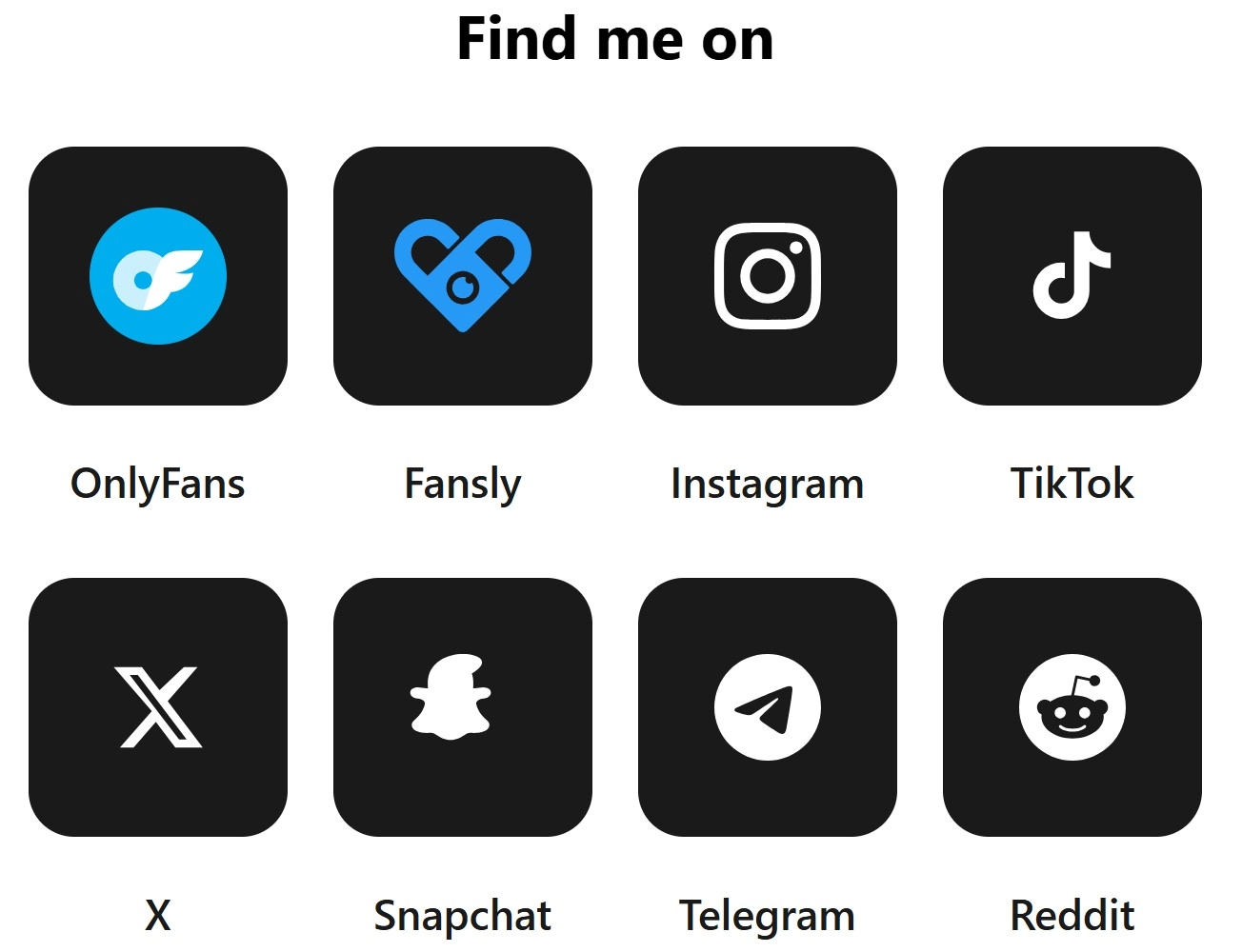
Here is what the Platform Grid block looks like with eight platforms in a four-column layout, dark card style with labels enabled:


Setting Up the Platform Grid Block
In your Bio-Link.se dashboard, add a Platform Grid block to your bio link page. The setup has four main sections.
Basic settings:
Title           — Optional heading above the grid: "Find me on", "Follow me"
Show Labels     — Toggle platform names below each icon on or off
Open in New Tab — Opens each platform link in a new browser tab
Columns Mobile  — 2, 3 or 4 columns on mobile screens
Columns Desktop — 2, 3, 4, 5 or 6 columns on desktop
Adding platforms:
Click Add Platform and select from the dropdown list. For each platform you enter a URL and optionally a custom label. Each platform has an enable/disable toggle so you can temporarily hide a platform without deleting it — useful if your TikTok gets restricted or you temporarily pause a Fansly account.
The Custom option accepts any Font Awesome icon class, which covers thousands of platforms and icons not in the default list. Use it for Patreon (fab fa-patreon), Ko-fi (fas fa-coffee), Throne, a personal website (fas fa-globe) or anything else.
Up to sixteen platforms can be displayed in a single block.
Column Layout — What Works Best
The column count controls how many icons appear per row. The right number depends on how many platforms you are showing and how much space you want each icon to have.
4 columns — Default, works well for 4–8 platforms
            Compact, professional, fits most bio link themes
            Recommended starting point

3 columns — Better for 3–6 platforms
            More breathing room per icon
            Good if labels are enabled

6 columns — Works for 6–12 platforms on desktop
            Very compact — disable labels at this setting
            Not recommended on mobile

2 columns — Use for 2–4 featured platforms only
            Large icons, strong visual weight
            Good if you want to emphasize OnlyFans + Fansly
On mobile, three columns is the default and works well for most configurations. Four columns on mobile is possible but makes icons small — only use it if you have many platforms and labels are disabled.
Card Shape and Style Options
The block has independent shape controls for the icon cards and the outer block wrapper.
Card shapes:
CopySquare   — 0px radius, sharp corners, editorial feel
Rounded  — 12px radius, default, clean and modern
Round    — 20px radius, softer, friendly aesthetic
Circle   — 50% radius, perfectly round cards
Circle cards work particularly well when labels are disabled — the result is a row of perfectly round icon buttons that feel native and app-like. Rounded cards are the most versatile and work across every bio link theme.
Card color — The background color of each icon card. The default is dark (#1a1a1a) which makes icons pop against most bio link backgrounds. For a light bio link theme, set cards to white or a very light gray and set the icon color to dark.
Icon and label color — Controls the color of Font Awesome icons and label text simultaneously. Set this to match your card color’s contrast — white icons on dark cards, dark icons on light cards. SVG icons (OnlyFans and Fansly) always display in their own brand colors and are not affected by this setting.
Icon size:
Small  — 28px SVG / 1.4rem FA — compact, works with 6 columns
Normal — 36px SVG / 1.8rem FA — default, recommended
Large  — 44px SVG / 2.2rem FA — bold, works with 2–3 columns
Platform Order — What to Put First
The order of platforms in the grid matters. Visitors scan left to right, top to bottom. Platforms in the top-left positions get the most attention.
Recommended order for OnlyFans creators:
Position 1  — OnlyFans     (primary revenue)
Position 2  — Fansly       (secondary revenue / backup)
Position 3  — Instagram    (largest social following)
Position 4  — TikTok       (discovery platform)
Position 5  — Twitter/X    (direct promotion)
Position 6  — Telegram     (private community)
Position 7  — Snapchat     (if active)
Position 8  — Reddit       (if active)
OnlyFans and Fansly should always occupy the first two positions. These are your primary conversion destinations — visitors who click them are going directly to a subscription page. Every other platform is secondary.
If you only use one subscription platform, put it first and use the second position for your most active social platform.
Using Platform Grid with Other Blocks
The Platform Grid block works best as a secondary conversion element — placed after your main subscription call to action, not before it. Visitors should encounter your pricing and subscribe options first, then have the option to follow you on social platforms if they are not ready to subscribe yet.
Recommended position on an OnlyFans bio link page:
1. OF Hero              — Profile header
2. Stats Showcase       — Social proof
3. Content Teaser       — Desire builder
4. Subscription Tier    — Primary CTA, pricing
5. Platform Grid        — Secondary CTA, social following
6. Tip Goal Tracker     — Community engagement
7. Price Menu           — Custom content
Placing Platform Grid after the subscription block means visitors who click away to Instagram or TikTok are doing so after they have already seen your pricing. They may not subscribe today, but they follow you on a social platform — and that follow becomes a future conversion opportunity every time you post.
The Platform Grid also pairs well with a Telegram or Discord link for creators who run a free community as a funnel into their paid subscription. A fan who joins your free Telegram group is far more likely to eventually subscribe than one who simply follows you on Instagram.
Labels On or Off
The Show Labels toggle adds the platform name below each icon. Whether to enable it depends on your layout and audience.
Labels on — recommended when:
Copy✓ You have fewer than 6 platforms in the grid
✓ You are using 3 columns or fewer
✓ Some platforms may not be universally recognized
✓ Your bio link has a clean, text-friendly aesthetic
Labels off — recommended when:
✓ You have 6 or more platforms and want a compact grid
✓ You are using circle card shape — pure icon aesthetic
✓ Your bio link theme is minimal or image-heavy
✓ All platforms are mainstream and instantly recognizable
For most OnlyFans creators, labels on with four columns and Rounded card shape is the best default — clear, professional and scannable.
Frequently Asked Questions
Can I add platforms that are not in the default list?
Yes. The Custom platform option accepts any Font Awesome icon class and any URL. This covers Patreon, Ko-fi, Throne, personal websites, shops and hundreds of other platforms. Enter the Font Awesome class name — for example fab fa-patreon — in the icon field and the icon renders in your chosen card color.
How many platforms should I show in the grid?
Between four and eight platforms is the most effective range for most creators. Fewer than four feels sparse. More than eight can overwhelm visitors and dilute the attention on your most important platforms. If you are active on more than eight platforms, prioritize the ones that drive the most traffic and followers.
Should OnlyFans and Fansly be in the platform grid?
Yes, and they should be in the first two positions. The official SVG brand assets for both platforms are included in the block and render at full quality at any size. Visitors immediately recognize both icons and understand what kind of creator you are before they read anything else on the page.
Does the Platform Grid block work on mobile?
Yes. The grid uses CSS Grid with a configurable mobile column count. The default is three columns on mobile, which gives icons enough size to be easily tappable — all cards meet the 44px minimum touch target recommendation. The hover effects that appear on desktop are replaced with an active-state scale animation on touch devices.
Can I temporarily hide a platform without deleting it?
Yes. Each platform has an enable/disable toggle in the settings panel. Disable a platform to hide it from the grid without losing the URL or label. This is useful when a social account is temporarily restricted or when you want to pause promotion of a specific platform during a campaign.